
1.Overview
Sque is a comprehensive legal operating system designed to unify all aspects of legal practice in one secure, intelligent platform. It combines case management, document organization, AI-powered assistance, billing, collaboration, and workflow automation—everything legal professionals need to work more efficiently and deliver better results for clients.
Rather than juggling separate tools for matters, documents, email, billing, and collaboration, Sque brings everything together in a single workspace where your team can access all case information, communications, and work in real time.
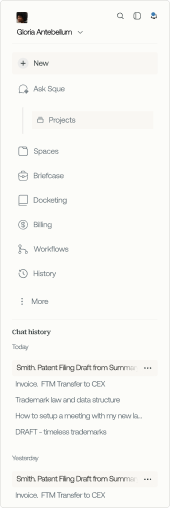
2.Navigate with Speed: Sidebar & Global Search
To start, Sque's sidebar is engineered for momentum. It puts your essential tools and most recent work within immediate reach—so you can stay in flow and move fast.
You can launch Global Search to find anything—instantly. Whether you're looking for a vault, a past Assistant thread, or a saved Workflow agent, search is always just a click or keystroke away.
- Mac: ⌘ + K
- Windows/Linux: Ctrl + K
- Or, click the magnifying glass icon at the top of the sidebar
3.Sque's Core Tools
Ask sque: Ask, Analyze, Draft
Create, refine, and analyze content all within Assistant. From a single view, you can ask questions, generate drafts, edit text, summarize long documents, or break down complex ideas.
Type a prompt directly, then upload documents or select knowledge sources — such as LexisNexis, EUR-Lex, EDGAR, search the web, or Vault — to focus responses on specific materials. Sque links every answer back to the exact sources used.
Briefcases: Large-Scale Document Review
Briefcases is purpose-built for professionals handling high-volume, high-stakes work. Upload, store, and analyze thousands of documents—all in one place. Use the briefcases Sidebar for fast access to active Briefcases or to launch a new one without breaking stride.
4.Optimizing Your Queries
- Be Explicit: Open-ended questions increase the risk of hallucinations. Instead of "What's the law on financial reporting?", specify "Summarize Delaware's financial reporting obligations for public companies."
- Provide Context: Describe the relevant facts, governing law, or uploaded documents.
- Use Proper and Clear Formatting: Request responses in tables, bullet points, or structured summaries for precision and always include punctuation at the end of your query.
- Break Down Complex Tasks: Ask one specific question per sentence for best results.
Define Your Audience & Tone:
- "Summarize for a senior in-house counsel."
- "Draft in a neutral, formal tone."
Frequently asked questions
Yes. You can update your personal preferences at any time from your profile settings, including notifications, display options, and workspace defaults. Changes apply to your account immediately unless noted otherwise.
Your preferences can affect tone, formatting, and how responses are presented, but they do not change the underlying legal definitions or matter-specific context Sque uses when analyzing your documents and queries.