
1.Uploading Documents to Ask Sque
Ask Sque can analyze documents you upload. This allows Ask Sque to summarize, review, extract information, and compare your legal documents.
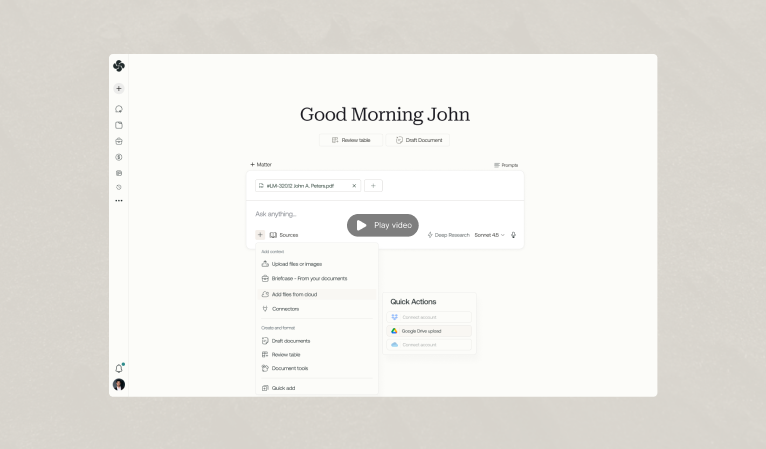
How to Upload Documents
- In the Ask Sque chat, click on the plus icon
- Click upload files or images from your computer or select from briefcases you can also select from files on the cloud if you have google drive, dropbox or OneDrive integrated.
- Supported formats: PDF, Word (DOCX), plain text, images with text
- Ask Sque reads the document and makes it available for analysis
- Reference the document in your questions: "Analyze this contract" or "Summarize this agreement"
2.What Ask Sque Can Do with Documents
Summarize
Ask Sque can condense a long document into key points.
Example Prompt
“Summarize this 47-page software license agreement for me”
Result
A concise summary of key terms, obligations, and risks
Extract Information
Ask Sque can pull specific information from documents.
Example Prompt
“What are the payment terms in this contract?”
Result
Specific payment terms, amounts, and schedules
Identify Issues and Risks
Ask Sque can flag problematic clauses or missing provisions.
Example Prompt
“What risks or unfavorable terms does this agreement contain?”
Result
Analysis of concerning provisions and potential issues
Compare Documents
Upload multiple documents and Ask Sque can compare them.
Example Prompt
“Compare these two contracts. What are the key differences?”
Result
Side-by-side comparison of terms, obligations, and differences
Analyze Compliance
Ask Sque can check if documents comply with legal standards.
Example Prompt
“Does this privacy policy comply with GDPR requirements?”
Result
Assessment of compliance gaps and recommendations
Generate Summaries for Clients
Ask Sque can create plain-English summaries for non-lawyers.
Example Prompt
“Create a client-friendly summary of this agreement in plain English”
Result
Clear explanation of what the agreement means and what client obligations are
3.Document Analysis Best Practices
Be Specific About What You Need
Vague: “Analyze this document”
Better: “Analyze this NDA and identify any overly broad confidentiality definitions”
Provide Context for Ask Sque
Good Context
“I'm reviewing this vendor agreement as part of our due diligence before contracting with Acme Corp. Are there any liability limitations that concern you?”
Use Follow-Up Questions
First Question: “Summarize this contract”
Follow-up: “What are the termination rights?”
Follow-up: “Can we terminate early without penalty?”
Multiple Document Comparisons
Upload multiple versions or related documents, then ask for comparison or consistency checks.
4.File Format Support
- Word (DOCX)
- Plain Text
- JPG/PNG Images
- PowerPoint
- Excel
Frequently asked questions
Yes. You can update your personal preferences at any time from your profile settings, including notifications, display options, and workspace defaults. Changes apply to your account immediately unless noted otherwise.
Your preferences can affect tone, formatting, and how responses are presented, but they do not change the underlying legal definitions or matter-specific context Sque uses when analyzing your documents and queries.